The update that wiped everything
I bought my Model 3 in September 2022, and the first thing I ran into with the browser was the bookmark manager. It barely works. So I did what any developer does: I built my own. A small page of shortcuts, laid out the way I wanted, stored right there in the car's browser. I spent hours getting it exactly right.
Then a minor software update came through. I got in the car, went to pull up my shortcuts, and they were gone. No notice, no warning, no way to get them back.
I was so frustrated that it took me a while before I could even make myself set them up again.
When I finally did, I made one decision: they were never going to live on the car again. Anything I built would live in the cloud, where a Tesla update could not touch it. That was the first version of TouchDash. A page I could open from the car that held my shortcuts and nothing else.
Once it was online, it stopped being just mine
Moving it to the cloud meant it had an account, a login, and a URL. At that point it was a small step from “my page” to “a page anyone could use.” So I opened it up. I kept adding the things I wanted in the car: a clock I could read from the driver's seat, weather that showed the one thing I needed to know, headlines I could page through at a stoplight. Every feature on TouchDash exists because I wanted it on my own screen first.
Trying to stop texting while driving
The feature I use most came from a bad habit. Every time I headed home I would text Jill, my wife, to say I was on my way. I knew I should not be doing that from the road. So I started looking for an automation: whenever I set the car to navigate home, send her a text for me.
That search is how I found the Tesla API. I am a software developer by trade, and that was the moment the whole thing opened up. The car could tell me where it was going. It could tell me when it would arrive. It could set navigation on command. I did not need an automation that sent “on my way.” I needed one button.
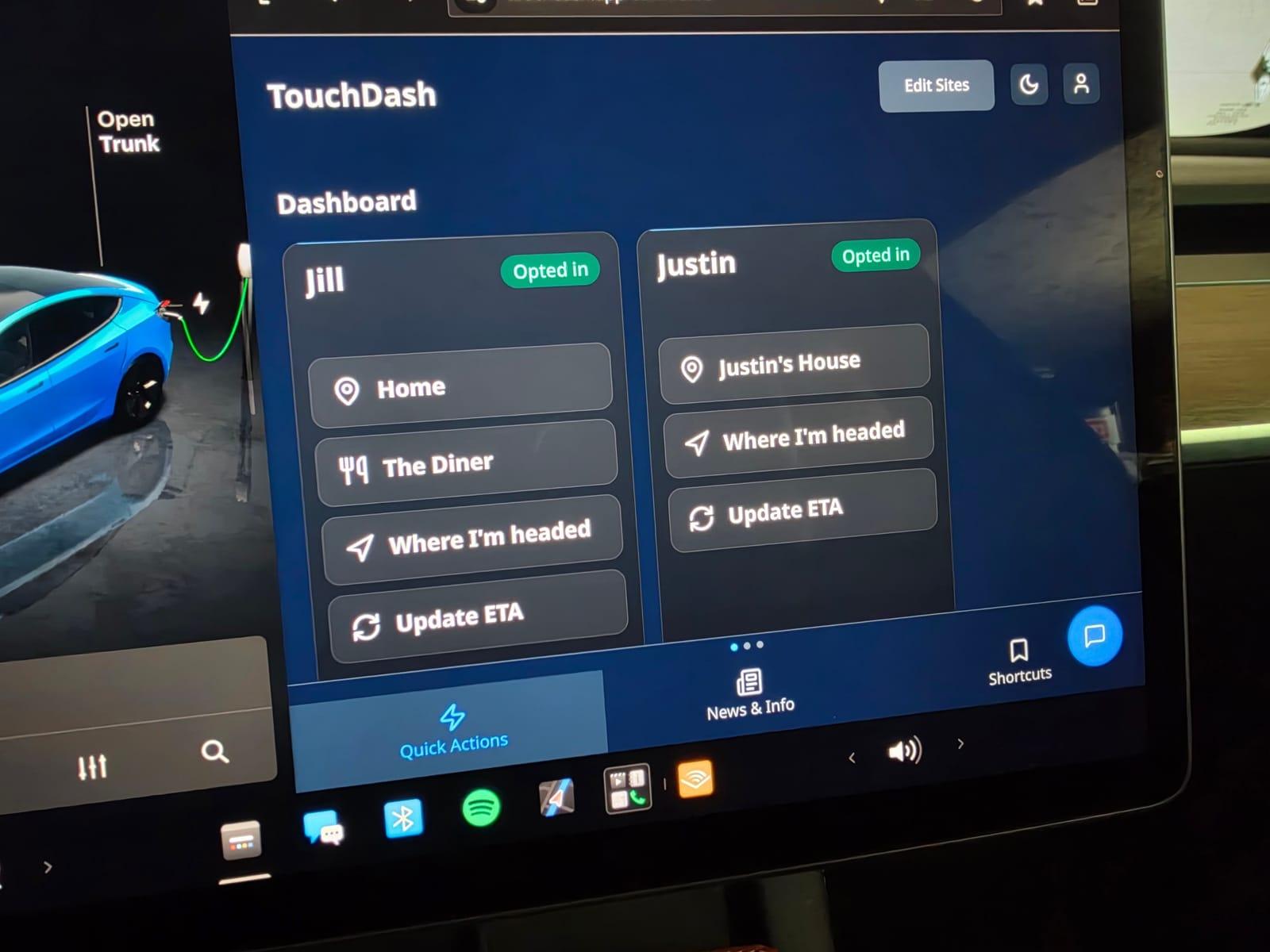
Tap it, and the car sets navigation home, reads its own ETA, and texts Jill the time I will walk in the door. One tap, eyes back on the road.
Then Justin, then everything else
Not long after, I noticed I was doing the same thing with my best friend Justin whenever I drove to meet him. So he got a button too. Then I wanted one for trips that were not to a saved place, so “Where I'm headed” reads whatever destination is already in the car's navigation and sends that. Then traffic would change and my ETA would be wrong, so “Update ETA” resends just the new time.
I have used it every day since. Of everything I have built into TouchDash, this is the part I would miss the most. Jill always knows when I will be home, and I have not typed a text from the driver's seat in a long time.
Where it goes from here
TouchDash is still built the same way it started: I add what I want in my own car, and if it is good, you get it too. The free plan gives you a person to text and ten ETAs a month, because I want you to feel what it is like before you decide. Pro is for when you want everyone you drive to, as often as you drive.
If something is wrong, or something is missing, tell me. There is a feedback button on every page and I read all of it.